
How to book your Hyperbaric session
This page is for customers who have already purchased. HBOT and red light are booked only through the app — by you in the member portal, or by our staff in the app when you call or WhatsApp. Your credit is taken when you book; changes need 24 hours' notice.
Book in four steps
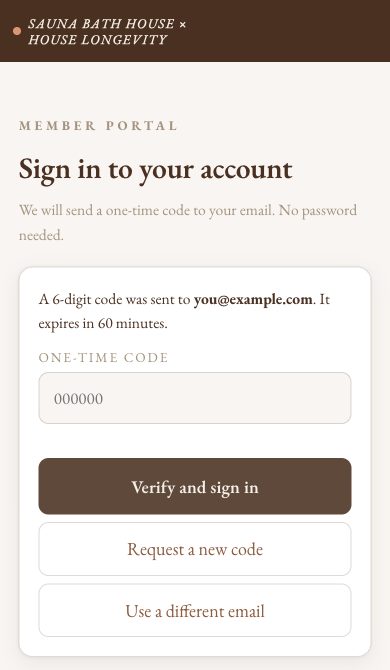
- Sign in to the member portal (saunabathhouse.com/members) with the email you bought with. We email you a 6-digit code; type it in and tap Verify and sign in.
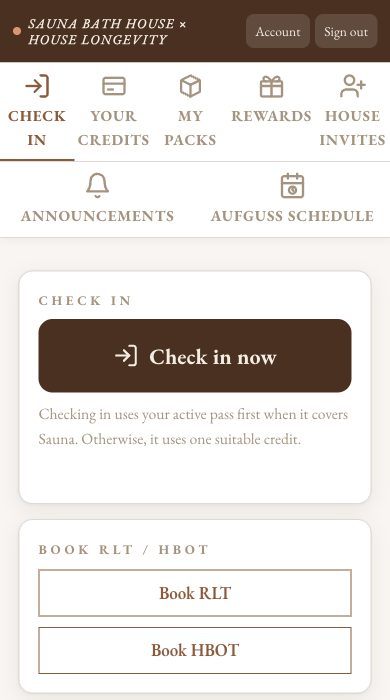
- Tap Book HBOT.
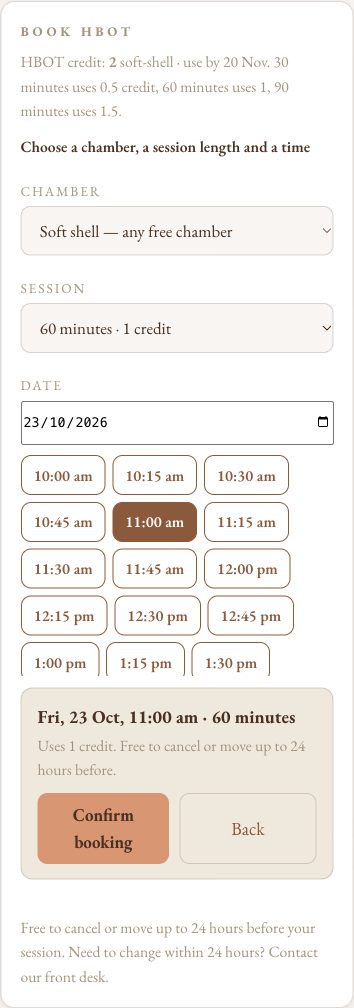
- Pick a day and a free time, then tap Confirm booking.
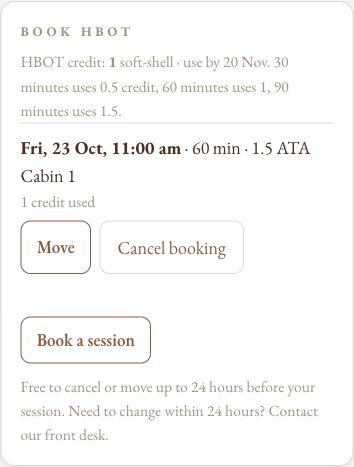
- Done: your booking shows in the portal.
How booking works
- 30 minutes uses 0.5 credit; 60 minutes uses 1 credit; 90 minutes uses 1.5 credits.
- Booked before we moved to the member portal? That booking stays as it is.
- No pack yet? Buy one first, or walk in and our front desk will help.
Your pack’s dates
What each HBOT pack allows:
- Try Everything: MUST activate within 1 month of purchase. Our front desk activates it at your first visit; if not activated by then, it starts automatically on that day. From date of activation: 1 month to use all three sessions. Personal.
- Recovery Week Pass: MUST activate within 1 month of purchase. Our front desk activates it at your first visit; if not activated by then, it starts automatically on that day. From date of activation: 7 days of use. Personal.
- HBOT First Timer: No activate-by date. Use within 1 month of purchase. Personal. One per person.
- HBOT First Timer · 2.0 ATA: No activate-by date. Use within 1 month of purchase. Personal. One per person.
- Race Month · 1.5 ATA: No activate-by date. 4 oxygen credits and 4 flexible credits. A flexible credit is one Sauna Bath House visit (the dry sauna, the cold pool and ice showers, the hot magnesium pool) or one red light session; an oxygen credit is one 60-minute session at 1.5 ATA. Don't want the oxygen? At the desk each unused oxygen credit becomes 2 flexible credits, never the reverse: convert all four and you hold 12 flexible credits. Show a race ticket, bib or any proof you are a racer at the desk for 4 more flexible credits (16 at most). Strictly one month from purchase, strictly no extensions: every credit ends with the month. To carry flexible credits from month to month, join a House Longevity plan, where up to 4 unused flexible credits carry each month and oxygen credits never do. Personal. Buy again if you want another month.
- HBOT 2.0 ATA Trial · 4 sessions: No activate-by date. Use within 2 months of purchase. Personal. One per person.
- HBOT 1.5 ATA · 5 credits: No activate-by date. Active from purchase; valid for 3 months. Personal.
- HBOT 1.5 ATA · 10 credits: No activate-by date. Active from purchase; valid for 6 months. Share credits with up to 5 people through Member Login.
- HBOT 1.5 ATA · 20 credits: No activate-by date. Active from purchase; valid for 12 months. Share credits with up to 5 people through Member Login.
- HBOT 1.5 ATA · 30 credits: No activate-by date. Active from purchase; valid for 12 months. Share credits with up to 5 people through Member Login.
- HBOT 1.5 ATA · 60 credits: No activate-by date. Active from purchase; valid for 12 months. Share credits with up to 5 people through Member Login.
- HBOT 2.0 ATA · 5 credits: No activate-by date. Active from purchase; valid for 3 months. Personal.
- HBOT 2.0 ATA · 10 credits: No activate-by date. Active from purchase; valid for 6 months. Share credits with up to 5 people through Member Login.
- HBOT 2.0 ATA · 20 credits: No activate-by date. Active from purchase; valid for 12 months. Share credits with up to 5 people through Member Login.
- HBOT 2.0 ATA · 30 credits: No activate-by date. Active from purchase; valid for 12 months. Share credits with up to 5 people through Member Login.
- HBOT 2.0 ATA · 60 credits: No activate-by date. Active from purchase; valid for 12 months. Share credits with up to 5 people through Member Login. Includes 30 bonus flexible credits, each one Sauna Bath House entry of up to 2 hours or one 20-minute red light session, worth $55; they share the pack's expiry and sharing. Bonus flexible credits have no cash value.
- HBOT 2.0 ATA · 90 credits: No activate-by date. Active from purchase; valid for 12 months. Personal. Includes 45 bonus flexible credits, each one Sauna Bath House entry of up to 2 hours or one 20-minute red light session, worth $55; they share the pack's expiry. Bonus flexible credits have no cash value.
- HBOT 1.5 ATA Single: No activate-by date. Use within 1 month of purchase. Personal.
Prices are subject to change at any time without notice. Anything you've already paid for keeps the price you paid.
Before you come
- Each credit = one 60-minute session in the machine, timed from when the zipper/door closes. 30 min = 0.5 credit · 60 min = 1 credit · 90 min = 1.5 credits, taken when you book. No 2.0 ATA credit left? Two 1.5 ATA credits cover one 2.0 ATA credit: 30 min uses 1, 60 min uses 2, 90 min uses 3. When you book you can select which credit to use, each shown with its use-by date; leave it on Automatic and we use the credit that fits your session.
- Wear comfortable cotton clothing, nothing with metal studs or zips. Read, rest or nap inside.
- Arrive 10-15 minutes early on your first visit for the walkthrough.
Phones and all electronics are NOT allowed during any HBOT session. Wear cotton clothing with no metal studs, zips or buckles (no studded jackets). You MUST arrive on time because the HBOT schedule is tightly controlled.
We have a small number of chamber appointment slots each day. Cancel or move less than 24 hours before your session = your credit is used.
Questions? Message House Longevity on WhatsApp 8088 2253.